.NET · MediatR · C# · Architecture
MediatR Pipeline Behaviors: Middleware for Your Application Layer
Logging, validation, performance monitoring, and transaction management written once and applied to every request automatically. A deep-dive into MediatR Pipeline Behaviors with four production-ready implementations.

Janardhana Bandaru
· 14 min read
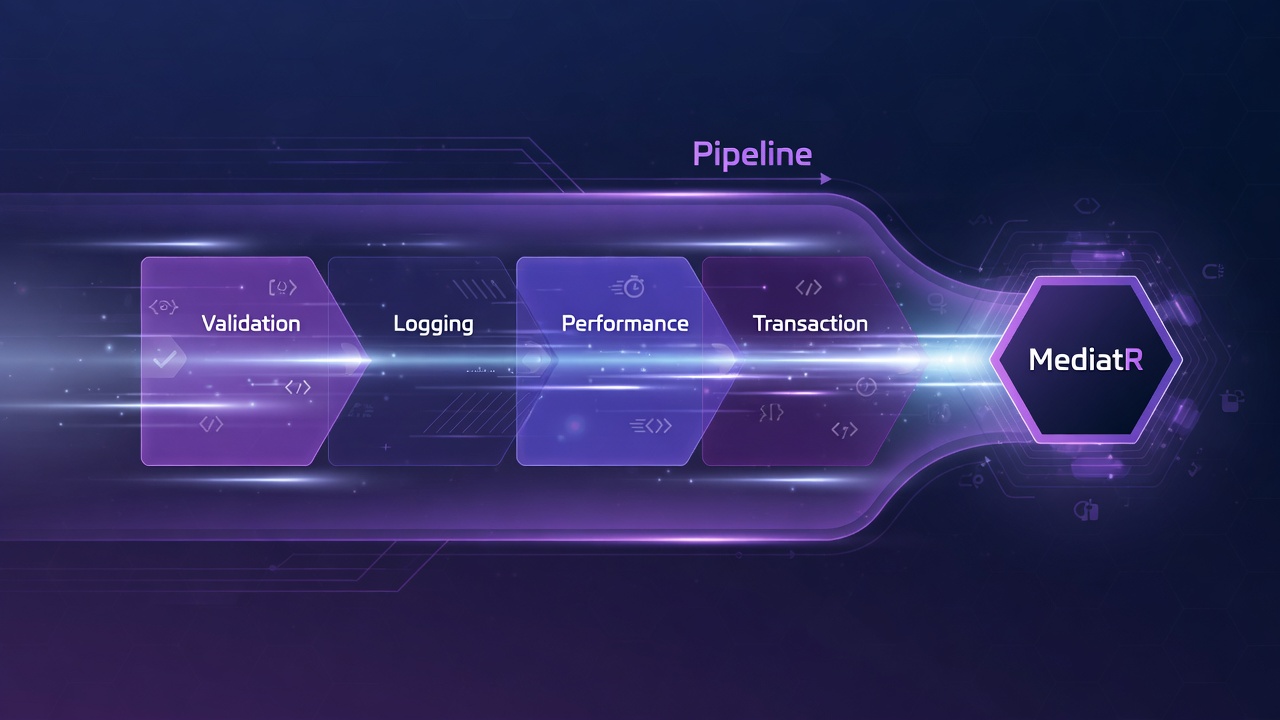
Open any command handler in a typical .NET codebase. Somewhere in the first five lines, there is a log statement. Somewhere before the actual work, there is a validation check. There is a transaction wrapper. A Stopwatch measuring how long it takes. And then, finally, the actual business logic: one or two lines that justify the existence of the whole file.
Now open the next handler. Same four lines. Same patterns. Different names, same structure. Multiply that by thirty handlers and you have a hundred and twenty lines of infrastructure code scattered across your application, none of which describes what your application does. Every time you want to change how logging works, you touch thirty files. Every time you add a new handler, you copy and paste the same scaffolding.
MediatR Pipeline Behaviors solve this. One logging behavior, registered once, applied to every request automatically. Same for validation, performance monitoring, and transaction management. This article covers how to build all four, how to control their execution order, and where this pattern starts to hurt.
What Is a Pipeline Behavior?
A pipeline behavior is middleware for your application layer. ASP.NET Core middleware wraps every HTTP request. MediatR pipeline behaviors wrap every MediatR request, whether it is a command, a query, or a notification. The interface is simple:
public interface IPipelineBehavior<TRequest, TResponse>
    where TRequest : notnull
{
    Task<TResponse> Handle(
        TRequest request,
        RequestHandlerDelegate<TResponse> next,
        CancellationToken cancellationToken);
}
The key is the next delegate. Calling await next() passes control to the next behavior in the chain, or to the handler itself if you are the last behavior. Everything you do before calling next() runs on the way in. Everything you do after runs on the way out. If you throw before calling next(), the pipeline short-circuits: subsequent behaviors and the handler never run.
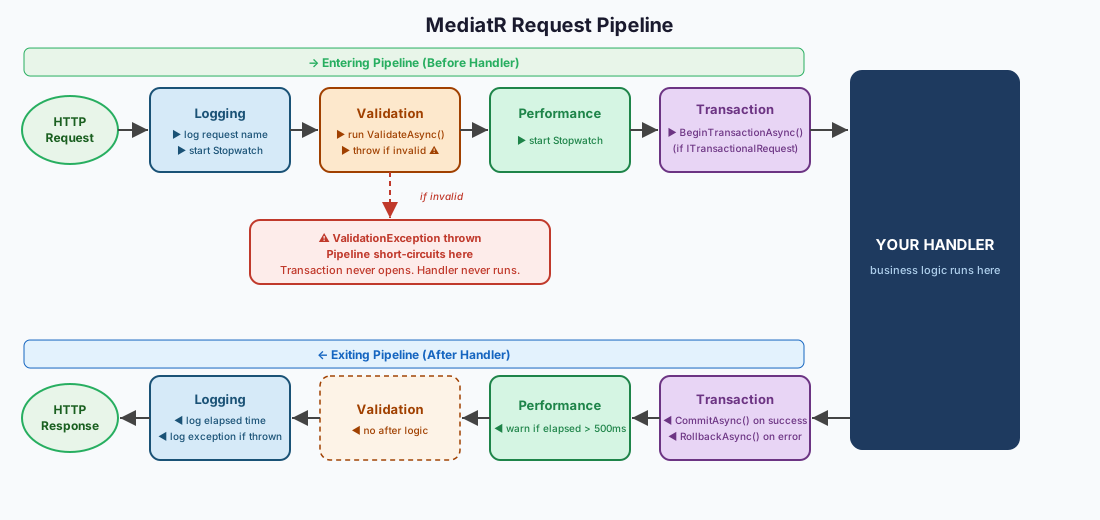
Each behavior wraps the next. The request enters the outermost behavior first and unwinds back through each layer on the way out.
The Four Behaviors Every Production App Needs
Most production .NET applications using MediatR converge on the same four behaviors. Not because it is a rule, but because these four cross-cutting concerns show up in every application that handles real load.
1. Logging Behavior
You do not want to add logging code to every handler. You want one place that logs every request going through the system: what it was, how long it took, and what went wrong if it failed. The logging behavior should be the outermost layer, because it needs to capture the total elapsed time including any validation failures or transaction rollbacks that happen in inner layers.
public class LoggingBehavior<TRequest, TResponse>
    : IPipelineBehavior<TRequest, TResponse>
    where TRequest : notnull
{
    private readonly ILogger<LoggingBehavior<TRequest, TResponse>> _logger;

    public LoggingBehavior(ILogger<LoggingBehavior<TRequest, TResponse>> logger)
        => _logger = logger;

    public async Task<TResponse> Handle(
        TRequest request,
        RequestHandlerDelegate<TResponse> next,
        CancellationToken cancellationToken)
    {
        var name = typeof(TRequest).Name;

        _logger.LogInformation("Handling {Request}", name);

        var timer = Stopwatch.StartNew();

        try
        {
            var response = await next();

            timer.Stop();
            _logger.LogInformation(
                "Handled {Request} in {Ms}ms",
                name, timer.ElapsedMilliseconds);

            return response;
        }
        catch (Exception ex)
        {
            timer.Stop();
            _logger.LogError(ex,
                "Error handling {Request} after {Ms}ms",
                name, timer.ElapsedMilliseconds);
            throw;
        }
    }
}
2. Validation Behavior
Validation should run after logging (so failures get logged) but before the transaction behavior (so a bad request never opens a database transaction). The behavior asks FluentValidation to run every registered IValidator<TRequest> for the incoming request. If any fail, it throws a ValidationException and the pipeline stops. The handler never runs.
public class ValidationBehavior<TRequest, TResponse>
    : IPipelineBehavior<TRequest, TResponse>
    where TRequest : notnull
{
    private readonly IEnumerable<IValidator<TRequest>> _validators;

    public ValidationBehavior(IEnumerable<IValidator<TRequest>> validators)
        => _validators = validators;

    public async Task<TResponse> Handle(
        TRequest request,
        RequestHandlerDelegate<TResponse> next,
        CancellationToken cancellationToken)
    {
        if (!_validators.Any())
            return await next();

        var context = new ValidationContext<TRequest>(request);

        // Run all validators concurrently.
        // ValidateAsync handles both sync and async validation rules.
        var results = await Task.WhenAll(
            _validators.Select(v => v.ValidateAsync(context, cancellationToken)));

        var failures = results
            .SelectMany(r => r.Errors)
            .Where(f => f is not null)
            .ToList();

        if (failures.Count > 0)
            throw new ValidationException(failures);

        return await next();
    }
}
3. Performance Behavior
Your monitoring tool alerts you when a pod uses too much memory. Nothing tells you when a command handler starts taking 800 milliseconds to run. The performance behavior closes that gap. It measures every request and logs a structured warning if it exceeds a threshold. A Dynatrace or Grafana alert on that log pattern catches performance regressions before users notice.
public class PerformanceBehavior<TRequest, TResponse>
    : IPipelineBehavior<TRequest, TResponse>
    where TRequest : notnull
{
    private readonly ILogger<PerformanceBehavior<TRequest, TResponse>> _logger;

    // 500ms is aggressive enough to catch real problems early,
    // lenient enough to avoid noise in normal operation.
    private const int SlowRequestMs = 500;

    public PerformanceBehavior(ILogger<PerformanceBehavior<TRequest, TResponse>> logger)
        => _logger = logger;

    public async Task<TResponse> Handle(
        TRequest request,
        RequestHandlerDelegate<TResponse> next,
        CancellationToken cancellationToken)
    {
        var timer = Stopwatch.StartNew();
        var response = await next();
        timer.Stop();

        if (timer.ElapsedMilliseconds > SlowRequestMs)
        {
            _logger.LogWarning(
                "Slow request: {Request} took {Ms}ms. Review query performance.",
                typeof(TRequest).Name,
                timer.ElapsedMilliseconds);
        }

        return response;
    }
}
4. Transaction Behavior
Every command that writes to the database needs a transaction. Without one, a handler that makes two writes can succeed on the first and fail on the second, leaving your data in a partial state. The transaction behavior wraps the handler call in a database transaction automatically: commit on success, rollback on exception.
The critical design decision here is selectivity. You do not want to open a database transaction for every read query. The behavior checks at runtime whether the incoming request implements ITransactionalRequest. If not, it skips. Only commands that opt in get wrapped.
public class TransactionBehavior<TRequest, TResponse>
    : IPipelineBehavior<TRequest, TResponse>
    where TRequest : notnull
{
    private readonly AppDbContext _db;

    public TransactionBehavior(AppDbContext db) => _db = db;

    public async Task<TResponse> Handle(
        TRequest request,
        RequestHandlerDelegate<TResponse> next,
        CancellationToken cancellationToken)
    {
        // Skip if this request did not opt in to transaction management.
        // Queries never implement ITransactionalRequest.
        if (request is not ITransactionalRequest)
            return await next();

        await using var tx = await _db.Database.BeginTransactionAsync(cancellationToken);

        try
        {
            var response = await next();
            await tx.CommitAsync(cancellationToken);
            return response;
        }
        catch
        {
            await tx.RollbackAsync(cancellationToken);
            throw;
        }
    }
}
Marker Interfaces: Selective Application
Not every request needs every behavior. Read queries should not open database transactions. Lightweight internal commands might not need performance monitoring. Marker interfaces are how you make behaviors selective without adding conditional logic to every handler.
// Commands that write to the database implement this.
// Queries do not. The TransactionBehavior checks for this interface
// and skips if it is absent, so read operations never open a transaction.
public interface ITransactionalRequest { }

// Usage on a command:
public record CreateOrderCommand(Guid CustomerId, List<LineItem> Items)
    : IRequest<Guid>, ITransactionalRequest;

// Usage on a query: no marker needed.
public record GetOrderByIdQuery(Guid OrderId) : IRequest<OrderDto>;
The same pattern works for caching. An ICacheableRequest interface with a CacheKey property lets a caching behavior apply only to queries that opt in. The behavior reads the cache key, checks the cache, and returns the cached response if available without calling the handler at all. That is the short-circuit pattern in practical use.
Registration and Execution Order
Behaviors are registered in Program.cs using AddOpenBehavior. The order you register them is the order they execute. First registered runs first on the way in and last on the way out.
services.AddMediatR(cfg =>
{
    cfg.RegisterServicesFromAssembly(Assembly.GetExecutingAssembly());

    // Registration order = execution order.
    // First registered = outermost = runs first entering, last exiting.
    cfg.AddOpenBehavior(typeof(LoggingBehavior<,>));
    cfg.AddOpenBehavior(typeof(ValidationBehavior<,>));
    cfg.AddOpenBehavior(typeof(PerformanceBehavior<,>));
    cfg.AddOpenBehavior(typeof(TransactionBehavior<,>));
});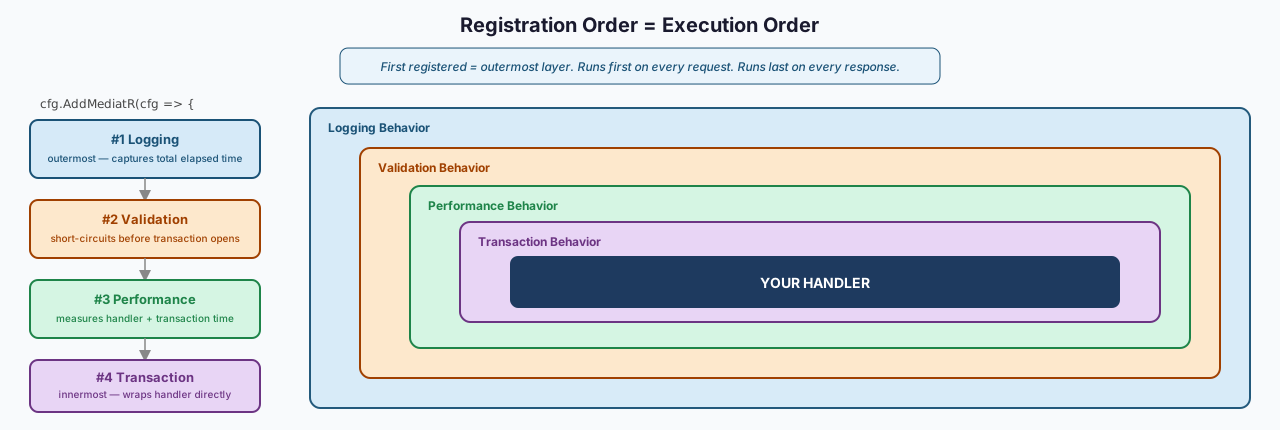
First registered becomes the outermost layer. It enters first on every request and exits last on every response.
Trade-offs and When Not to Use This
Behaviors have real costs. The first is debugging opacity. When something behaves unexpectedly, you have to reason through multiple layers of wrapping before reaching the handler. A junior developer who does not know behaviors exist will look at the handler code and not understand why a transaction is being opened or why their validation is running. The behavior is implicit, which is powerful and invisible at the same time.
The second is registration order bugs. If you register ValidationBehavior after TransactionBehavior, a request that fails validation still opens and rolls back a database transaction every time. That is not a compile error. It is a performance problem you will discover under load.
- Use it when you have repeated infrastructure code across multiple handlers
- Use it when your team understands the middleware pattern and knows to look for behaviors first
- Skip it for simple CRUD applications with two or three handlers. The overhead is not worth it.
- Skip it when your team is still learning MediatR. Behaviors are an intermediate concept. Getting comfortable with handlers and the request/response pattern first makes behaviors easier to understand when you introduce them.
Conclusion
Four behaviors, registered once, applied to every request in the system. Logging that captures failures. Validation that blocks bad data before it reaches the database. Performance monitoring that catches slow handlers before users do. Transaction management that commits or rolls back automatically. None of it lives inside your handler.
This is what MediatR was built for. The IRequest and IRequestHandler interfaces are the entry point. The pipeline is where the real architecture happens.